Frankly, I can't remember the last time I picked up my digital camera. Since a smart phone is always on me, either in my bag or back pocket, I use its camera constantly while my perfectly capable point-and-shoot sits on a shelf at home gathering dust.
I know I'm not alone. As cell phones have gotten better and better, their built-in digital cameras have advanced immensely. While they're still not as good as dedicated cameras, smart phones have a couple of big advantages on their side: they run third-party software, and they have Internet access.
That means I can add applications that let me manipulate photos in interesting ways, using the phone's touch screen to go beyond the "black and white" and "vivid color" modes of dedicated cameras, and then share the results.
Here's a look at some noteworthy apps that can make your photos pop:
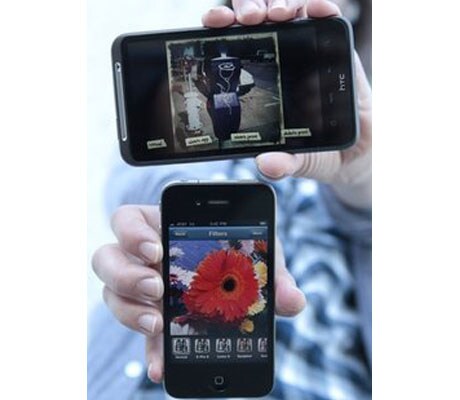
Instagram (iPhone, free): Instagram is as much of a social app as it is a camera app, and it makes it easy and quick to share artistic shots with your buddies.
After downloading the app and signing up, take a photo or choose one from your photo roll. Then, choose from more than a dozen "filters," or manipulation schemes, that are conveniently previewed at the bottom. The filters generally give photos an old-fashioned look not surprising since the team behind the app, Burbn Inc., cites Polaroid cameras as an inspiration. (The language of old-school photo buffs permeates the apps. Photographers who shot on film used to manipulate their photos with clear glass "filters" they put in front of their camera lenses.)
You can add a description and location to your photo, and then add it to your Instagram photo feed, which shows the photos you and your friends have posted. You can publish your photos to a number of other social sites as well, including Twitter, Facebook, Flickr and Foursquare.
I enjoyed scrolling through the photos my friends had posted, "liking" the ones I thought were best and commenting on some. I quickly got used to checking out the list of most popular photos, which is an excellent, ever-changing source of beautiful shots (and, potentially, new people to follow on Instagram).
Camera Bag (iPhone, $1.99): One of the simplest apps I tried, Camera Bag consists mainly of a collection of filters that, like Instagram, you can apply to photos you take with the app or the iPhone's built-in camera app.
Within Camera Bag, you take a shot and are then given the option to re-take or use that photo. If you choose to use it, you can then scroll sideways through the list of 13 filters "infrared," "fisheye," "silver," "1974" and more to see a preview of how the photo will look. You can save a copy of the photo with one filter, or several copies with a filter apiece, and e-mail them to friends.
It was easy to use the app, which was created by Nevercenter Ltd., to jazz up my photos. I especially liked the "fisheye" lens filter and the way the "Plastic" filter brought out orange and blue tones. If you are looking for an app that will give you a ton of options, however, Camera Bag may be too simple.
Vignette (Android, $4.01): My favorite of the Android camera apps I tried, Vignette includes a ton of camera, film and lens effects that can be used to create all sorts of images.
There are plenty of effects: "Vignette" will focus on the middle of the shot and "Velvia," named after a famous slide film, brightens up colors. The "dreamy" lens effects will soften up the image and "random" will just apply an effect of the app's choosing. You can use filters to highlight certain colors, instruct the app to switch one color out with another and choose from a slew of vintage tints or toy camera effects.
The app, which comes from developers neilandtheresa, also lets you customize settings to your liking by scrolling down a long list of options: For example, if you want to take photos with a grainy-looking film, soft-focus halo, magenta filter, extra "light leaks" (as if streak of light had hit film in a broken camera) and a timestamp like you'd see on a digital camera, you can just check these boxes and start snapping.
While I spent more time futzing with Vignette's setting than with other apps I tried, I also got the most interesting, varied shots with it. Wandering around a local park, it helped me brighten up the blue sky and highlight the yellow of a bell flower with the sun shining through. In another image, the park's green grass and treetops shone chartreuse while the sky, cars and tree trunks showed up in black, white and gray.
Beyond all these effects, Vignette includes a variety of adjustable camera settings, including contrast, saturation, sharpness, exposure and white balance. There's also an option to touch the screen anywhere to take a photo, which I found useful since I was testing the app on a phone that doesn't include a dedicated camera button.
Compared to other camera apps, Vignette is pricey, but its capabilities make it worth the cost. And if you're curious to try it out but don't want to commit just yet, there's also a free demo version available.
Retro Camera (Android, free): As its name implies, Retro Camera lets you take photos that look as if they were shot with old-style cameras. The app, which comes from Urbian Inc., includes the app developer's takes on five different "cameras" that you can shoot with: The Barbl, Little Orange Box, Xolaroid 2000, FudgeCan and Pinhole. Each camera can be used in color or black-and-white mode, and the images I got were definitely retro and cool-looking.
My favorites were The Barbl and Little Orange Box, which are modeled off of a `50s East-German camera and a `70s Russian camera, respectively. Shots I took with The Barbl looked a little washed-out, while those taken with Little Orange Box were high-contrast and sharp-looking, occasionally with scratches on the images.
I also loved some of the app's quirky touches, such as the way the "camera" you're using fills up the phone's screen and gives you its own little viewfinder, and how the photos you've taken are arranged on a virtual clothesline, clasped by virtual clothespins a reference to how photos were hung to dry after processing in a darkroom.
Jelly Lens (Any cell phone, price varies): Who says smart phones should have all the fun? As long as your cell phone has a camera you can use a little gizmo called the Jelly Lens to add special effects to any photo you take (and if you do have a smart phone, you can use this with any app you like).
Much like the glass filters employed by old-time photographers, the Jelly Lens is a little plastic lens filter with a sticky ring on its back that you can attach to the lens of any small camera. Each Jelly Lens comes with one built-in filter with an effect like "kaleidoscope," "stretched" or "wide angle."
I bought one with a "starburst" effect that blurs the edges of the image to create a sometimes-dreamy, sometimes-streaky shot, depending on what I was photographing. Through the Jelly Lens, an ice-cream-stick sculpture on my mantle became a psychedelic work of art. And I liked that the focal point on the filter was slightly off-center, so I could turn it to choose my focus.
I appreciated the Jelly Lens' built-in keychain and cell phone loop definitely useful since it could easily get lost. I wasn't that thrilled with its level of stickiness, though, as it often fell off the back of my phone. You can wash it with soap and water to remove any gunk that gathers and make it sticky once again, but I only had limited success with this.

As smart phones get an increasing array of features, they need faster processors. The Motorola Atrix 4G, billed as "the world's most powerful smart phone," arrives with 2 gigahertz of processing power_ the kind you're more likely to find on a laptop than a phone.
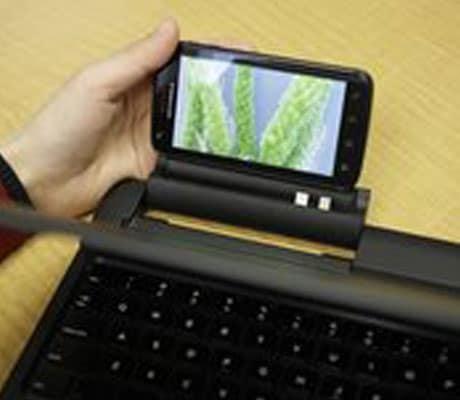
That's notable because there's an optional laptop dock, which makes the phone function as, well, a laptop.
The Atrix is available now for pre-order from AT&T Inc. and will begin selling March 6. It costs $200 with a two-year contract. But if you buy it with the dock, it will cost $500 after rebate, and you'll have to get a more expensive data plan.
On its own, the Atrix is a speedy phone, though not necessarily eye-catching. With the skinny, light dock, the Atrix is a Web surfing and e-mailing champ, which could make it a good travel buddy. For heavy-duty computing, though, I'd still stick with my full-featured laptop.
The Atrix's black slab exterior makes it look like other smart phones, but start poking around and the difference is clear: This is a fast handset. With tasks that don't require a wireless network, such as taking photos or playing games, the Atrix opened menus and applications without hesitation. The camera seemed to start up faster than those on other smart phones I've used, and I could scroll through applications and contacts on its 4-inch screen with ease.
Considering its processing power, I was miffed to see the Atrix is currently running version 2.2 of Google Inc.'s Android operating system, Froyo, rather than the newer Gingerbread version, whose faster performance and better on-screen keyboard would match well with the Atrix.
The Atrix works on AT&T's upgraded 3G network, HSPA+, so to try it out I walked to AT&T Park, where the San Francisco Giants play. There, the phone streamed videos as flawlessly as if I were on my home Wi-Fi network. At my office or home I wouldn't even attempt to stream content over AT&T's network as service is unreliable.
Not surprisingly, call quality at AT&T Park was also excellent. My mom, a frequent target of my test calls and sharper critic of sound quality than I am, even said that the Atrix sounded "pretty good for a cell phone." But in my office, where AT&T's reception is spotty, I had to try several times to get a call to go through. When I finally did, a friend sounded muffled on the other end (he said I did, too).
The phone's display is clear and bright, with good viewing angles that would make it useful for sharing video clips with a friend. When streaming YouTube content, such as Nicki Minaj's "Moment 4 Life" music video, I didn't feel as if the colors were as warm as they could have been, though. Like a growing number of phones, the Atrix can play Flash videos something the iPhone can't do.
The 5-megapixel camera on the Atrix's back wasn't impressive. Photos were crisp, but colors didn't really pop. And there are only a handful of settings and color effects, so if you want to get creative you'll need to download a camera app (free ones include Camera 360 Lite and Retro Camera).
You'll also need to snag an app such as Qik if you want to video chat with a friend: The Atrix has a front-facing camera, but it doesn't include video chat software.
I expected long battery life, especially with AT&T claiming that you can watch two full-length movies in a row on a single charge. The phone is rated for up to nine hours of talk time, and in a day that included much multitasking and streaming a full-length animated movie from YouTube over Wi-Fi, the battery held up well.
I also expected a lot from the dock, especially because Motorola Mobility Inc. isn't the first to come up with the idea of combining a phone with a laptop-like dock: One high-profile example came from Palm, now owned by Hewlett-Packard Co., which in 2007 announced and subsequently shelved a laptop-like device called Foleo. It would have acted as a companion to users' Palm Treo smart phones.
Once I plugged the Atrix into the laptop dock, I entered a combination phone-netbook experience, which gave me more functionality than with the handset alone but not as much as I'd have with a dedicated laptop.
The dock has a bright, crisp screen that measures 11.6 inches diagonally, a full-but-slightly-cramped keyboard and a large touchpad. There are two USB ports and a standard headphone jack. Because the dock has its own battery, it can charge the Atrix while they are attached. Oddly, the dock doesn't have a front-facing camera, so you can't use it for video chats.
With the Atrix attached to the dock, a small "mobile view" on the dock's screen shows you what's on your phone's screen you can use this to access phone functions like making or answering calls or sending text messages, which is neat.
The dock's main appeal is that it includes the Firefox Web browser, allowing you to surf the Web uninhibited by the limitations imposed by the phone's smaller display. The dock is great for checking e-mails and visiting websites, and you could use it for some work, too.
Still, it's not a computer. Without the Atrix plugged in, the dock does nothing. It's expensive, and you'll have to add on a $20 per month for AT&T's mobile hotspot feature (on the plus side, this will enable you to connect four more gadgets to the Internet through your Atrix).
If you're hankering for a speedy phone, the Atrix is a good bet. I'd hold out on the dock, though. It could be a useful accessory in the future, but for now its price doesn't match up to its limited functionality.
 It's quite a challenge at times to make a phone call, it requires many steps. For instance, thinking of a person to call, finding their names on the cell phone or dialing their number and waiting for the call to connect. Too many steps, right?
At least some US researchers think so. They have now figured out a way that relies on thought power alone to make such calls without lifting a finger.
Users wear a specially designed headband hooked up to a Bluetooth device that wirelessly sends commands to a Nokia N73 mobile phone.
The technology works by responding to cues from the brain and experts believe anyone with training will be able to master the technique, the Daily Mail reports.
Tzyy-Ping Jung at the Swartz Centre for Computational Neuroscience at the University of California, San Diego, said the device relies on electroencephalogram (EEG) electrodes on the scalp to work out what the brain is trying to say.
Jung believes it could be 100 percent accurate with just a bit of training.
The breakthrough is likely to create safer hands-free mobile phones to help the disabled or elderly and help professionals in high pressure work environments.
The initial experiments of the device were between 70 percent and 85 percent accurate when trying to dial a 10-digit phone number.
Thought powered computers have been around for a while, however this is the first time it has been adapted for mobile phones.

Google's Android mobile operating system will power nearly half of the smartphones worldwide by the end of next year, technology research company Gartner said on Thursday.
Worldwide smartphone sales will reach 468 million units this year, up 57.7 percent from 2010, increase to 630 million units next year and to 1.1 billion units in 2015, Gartner said.
Gartner said Android software, which Internet giant Google makes available to handset makers such as Samsung, HTC and Motorola for free, will be the most popular smartphone operating system(OS) worldwide by the end of 2011 with a 38.5 percent market share, rising to 49.2 percent next year and 48.8 percent in 2015.
Apple's iOS for the iPhone will hold a 19.4 percent share of the smartphone operating system market by the end of 2011 followed by Nokia's Symbian with 19.2 percent and Blackberry maker Research In Motion with 13.4 percent, Gartner said.
Microsoft's Windows mobile operating system will account for 5.6 percent of the smartphone market at the end of 2011 but will rise to 10.8 percent in 2012 and 19.5 percent in 2015, Gartner said.
The iPhone's market share was forecast to remain relatively stable at 18.9 percent in 2012 and 17.2 percent in 2015.
Symbian's smartphone share will decline to 5.2 percent next year and virtually nothing by 2015 as the Finnish telecom giant replaces the current operating system with Microsoft's platform.
Gartner said the rise of Android will bring lower smartphone prices.
"By 2015, 67 percent of all open OS devices will have an average selling price of $300 or below, proving that smartphones have been finally truly democratized," Gartner principal analyst Roberta Cozza said.
"As vendors delivering Android-based devices continue to fight for market share, price will decrease to further benefit consumers," Cozza said.
"Android's position at the high end of the market will remain strong, but its greatest volume opportunity in the longer term will be in the mid- to low-cost smartphones, above all in emerging markets," she said.
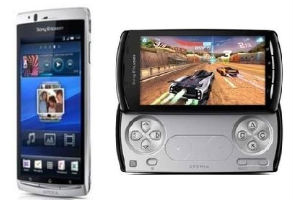
 Sony Ericsson has added to its Xperia smartphone lineup in India with the launch of the Xperia Arc and the Xperia Play in India for Rs. 32,000 and Rs. 35,000 respectively.
Lets start with the self-proclaimed gaming smartphone: The Xperia Play.
The Xperia Play is a PlayStation certified smartphone running Android 2.3 Gingerbread and boasts of dedicated Dual Shock style gaming controls along with six axis motion controls.
Under the hood, the Xperia Play runs on a 1GHz Qualcomm MSM8655 CPU with Adreno 205 GPU and 1GB ROM. The device has a 4-inch capacitive touchscreen display with a resolution of 854x480 pixel and internal storage of 400MB expandable to 32GB via a micro SD card. The rear of the device houses a 5MP camera with LED flash. The Xperia Play will come preloaded with 6 games and 70 games will be available for download via the PlayStation Pocket Store.
Although the device has a strong lineup of games, it's the hardware configuration that is a little disappointing. While the world is moving to dual core processors in smartphones, the Xperia Play still has a single-core processor. The battery life too is a bit disappointing as the company claims 3.5 hours of juice when the device is used solely for gaming.
Being a gaming phone it sacrifices phone ergonomics in favour of the normal phone. The headphone and charging jacks are placed in a way that they are best used while gaming - while using it as a phone or a music player, the placement does not seem to be as good. The volume rocker has also been displaced to give way to the L/R buttons of the game controller.
Does the device justify a price tag of Rs. 35,000? Take a look at our video review to find out.
The Xperia Arc on the other hand is just 8.7mm thin at its slimmest point. The device boasts of a 1GHz Qualcomm MSM8255 CPU with Adreno 205 GPU, Android 2.3 Gingerbread OS, a 4.2-inch BRAVIA engine reality capacitive touch-screen display with a resolution of 854x480 pixels.
The device has 320MB internal storage expandable upto 32GB via micro SD card. The rear of the device houses an 8.1 MP camera with Sony Exmor R image sensor.
The Xperia Arc is a stunning device if viewed as a standalone product. But compare it to the current market offerings and you have better options out there at better price points. LG has recently launched the Optimus X2 that boasts of a NVIDIA Tegra 2 Dual core processor and Android 2.2 upgradable to 2.3. The camera on both the devices too has an 8MP censor. The Arc however has a larger screen by 0.2-inches and boasts of Sony's BRAVIA technology.
Both the Xperia Arc and the Xperia Play boast of Sony Ericsson's custom built UI called Timescape that integrates all your social media, messaging and communication under one app.

Popular social network Facebook has updated its official App for Apple iOS platform. The new update in the Facebook App includes the much demanded un-friend option that will let you remove people you might have added in haste or those you don't wish to be friends with. Apart from that, users will get to view a Map of the Place they've checked in. Even the News Feed has been improved but there's still no option to hit Like on any comment.
Facebook App for iOS platform hasn't got much visual or cosmetic changes but only feature additions along with bug fixes in the last couple of updates. Even the recent Facebook v3.4 App brings large number of bug fixes for the App. The new nifty additions in this update are:
- Added Map View for Places
- Added the ability to Check in to Events that you're attending
- Added the ability to un-friend from the phone
- Improved News Feed
- Improved notifications UI
Download the new Facebook v3.4 App for iPhone, iPod touch or iPad from here or simply update your current Facebook App from the iOS App Store.
 The Apple iPad 2, which is still very difficult to acquire at Apple retail stores, is creating a robust and healthy resale market online.
EBay, the online marketplace, released numbers and an info graphic on Thursday showing just how popular the iPad 2 had become on its Web site.
The company said that 65 percent of iPad 2s sold on eBay were purchased by buyers in the United States. In 2010, only 35 percent of sales of the first generation iPad were sold domestically on the online marketplace. The higher numbers in the United States this time illustrates just how difficult it is to acquire the new tablet through traditional retail stores. Apple stores continually sell out of the new tablet, and the wait to get one purchased online is still five weeks.
Although the majority of sales on eBay have taken place in the United States, people living in Russia, Canada, Hong Kong, Japan and Britain have also purchased a large number of iPad 2s.
The most sought-after models of the iPad 2 are on the low and high end. The basic 16-gigabyte Wi-fi-only version and the 64-gigabyte with 3G data connection account for a majority of iPad 2 sales on eBay. They also net a healthy profit for sellers. EBay said that the low-end iPad 2 was selling for $198 over the $500 retail price and the $830 high-end model was selling for an astounding $406 more.
The least desired iPad 2 is the 16-gigabyte 3G model, making up only 7 percent of iPad 2 sales.
The first-generation iPad is still selling well online too. As I've written in the past, many buyers are still hoping to find deals on the first iPad, which is selling for $200 less than the original price in online marketplaces.